How to Create and Sell a Printable Study Planner for Students in Canva: A Step-by-Step Guide


A student sits down to revise for exams with three subjects, two deadlines and no plan — and by 9 p.m. she has done a little of everything and finished nothing. That scattered evening is exactly why a printable study planner for students to sell is such a strong first product. Students do not need another app. They need one clear set of pages that tells them what to study, when to revise it, and whether they did it.
In this guide, you will build that 12-page set in Canva, price it at $5–$9, and list it where students already shop. But here is the part most people miss: the planners that sell best are not the prettiest ones. They are the ones that help a student survive exam week without panicking.
What Is a Printable Study Planner for Students?
A printable study planner for students is a set of PDF pages a student prints at home and uses to plan study sessions, track homework, and count down to exams. It is a simple file the buyer downloads, prints, and writes on — no app, no subscription.
Featured snippet answer: A printable study planner for students to sell is a 12-page PDF set made in Canva that helps students plan study sessions, track homework and revision, and count down to exams. Design it once and sell the same file again and again on Etsy or your shop for $5–$9.
A good set covers one student’s whole study week in one place. Your 12-page set will include a weekly study timetable, a daily study log, a homework tracker, a revision tracker, an exam countdown, a subject overview, a weekly review, a goal-setting page, a notes page, a monthly calendar, a to-do list and a cover page.
Most buyers are students aged 13 to 22, plus parents buying for a teenager. Your job is to make their study life easy: large writing boxes, clear headings, and rows they can write in with a normal pen.
One page, one job. That single rule will put your planner ahead of most of the listings you will see.

Step 1: Pick One Student and One Study Problem
What to do: Choose one student type and one study problem before you open Canva — a planner for a 15-year-old revising for school exams and one for a college student juggling five courses are different products.
Exactly how: Pick one student shape: a school student ages 13 to 16, a college student ages 18 to 22, or an exam candidate preparing for one big test. Then pick one pain that student says out loud, such as “I never know what to revise first” or “I keep missing homework deadlines”. Search that pain on Etsy and study the top 20 results. If at least three listings have strong reviews and clear preview images, real buyers exist.
Example: “Printable Study Planner for Students | 12 Pages | Timetable, Revision Tracker & Exam Countdown” tells a buyer the audience, the pages, and the result in one line. “Cute Study Planner” tells her nothing.
Pro Tip: Check Pinterest saves for your phrase before you commit — high saves plus modest competition is the green light for a first set.
Step 2: Map Your 12 Pages Before You Design
What to do: Write the full page list before you design page one — twelve pages is the sweet spot for a study planner that feels complete without padding.
Exactly how: List these twelve pages in order: (1) cover page, (2) weekly study timetable, (3) daily study log, (4) homework tracker, (5) revision tracker, (6) exam countdown, (7) subject overview, (8) weekly review, (9) goal-setting page, (10) monthly calendar, (11) to-do list, (12) notes page. Note what a student writes on each page; if a page needs more than one sentence to explain, split it or cut it.
Example: The weekly study timetable holds seven days across the top and six study blocks down the side, and the exam countdown holds 30 rows: date, subject, topic, and one tick box. The same one-page-one-job rule keeps a printable homeschool planner useful for parents too.
Pro Tip: Ask one real student to read your page list aloud — if they pause, fix that page before you open Canva.
Step 3: Set Up Your Canva File the Right Way
What to do: Create one Canva file at US Letter size with clean margins, so every page prints the same way.
Exactly how: Open Canva and click Create a design, then Custom size. Enter 8.5 x 11 inches (US Letter) and create the file. Turn on Show margins under File, then Settings, so you can see the safe area. Keep all 12 pages the same size — never mix Letter and A4, because buyers print the whole file at once. Pick two fonts at most and three colours plus black and white, then use them on every page.
Example: Use a deep navy for headings, a soft sky blue for table headers and black for body text — a palette that prints cleanly in black and white on shared school printers.
Pro Tip: Keep your writing lines at least 0.4 inches tall — students write by hand, and cramped lines are the number one complaint in planner reviews.
Step 4: Design the Planner Pages in Canva
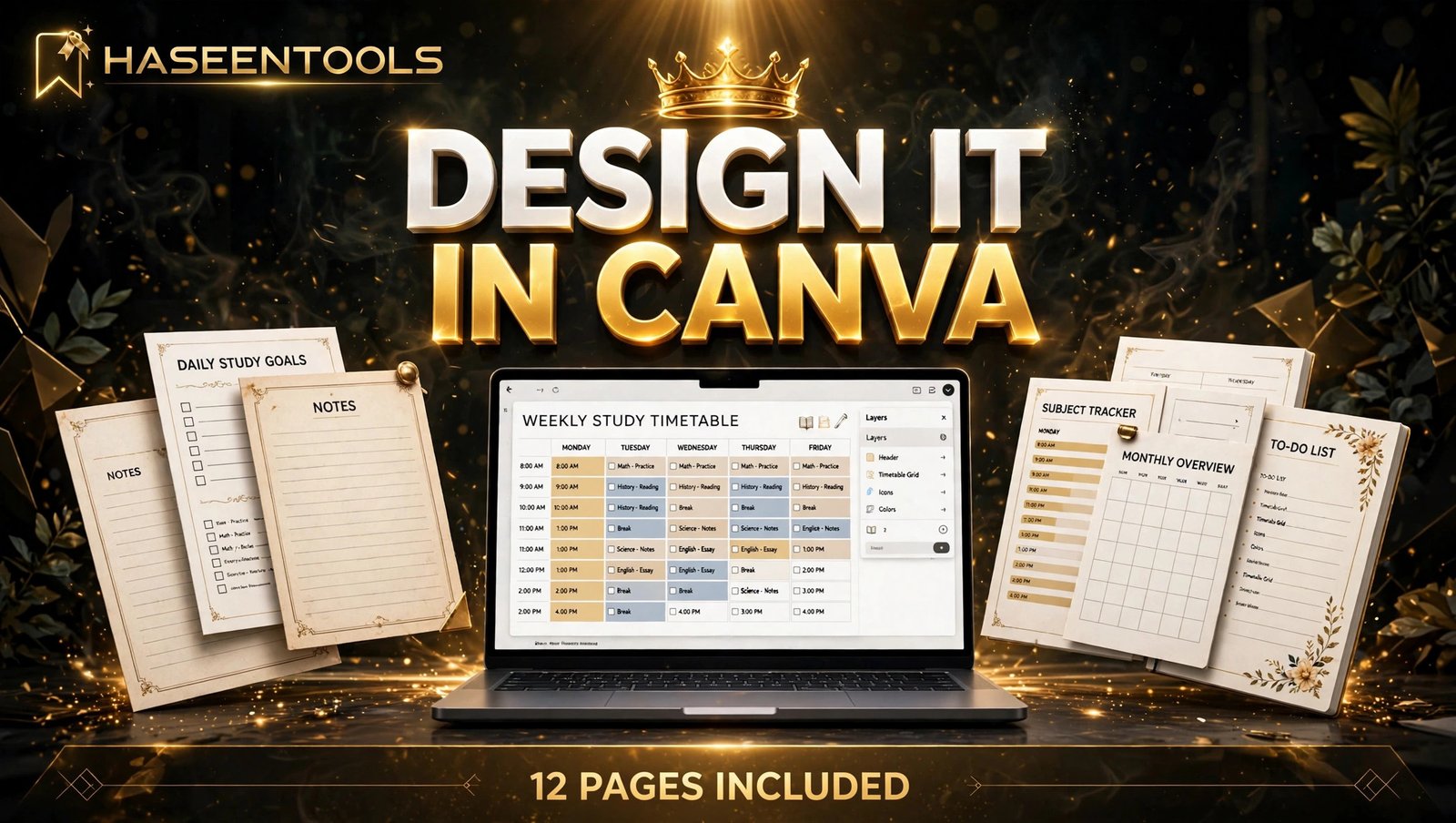
What to do: Build each of the 12 pages of your printable study planner for students to sell as a simple, scannable table or list — one job per page and plenty of white space.
Exactly how: Start with the weekly study timetable, since it is the page buyers judge first. Add a title bar, seven day columns and six study blocks, then a small box at the bottom for notes. Duplicate that structure for the other pages: homework tracker with subjects down the left and due dates across the top; revision tracker with topics down the left and a tick or cross in each cell.
Example: Your homework tracker can hold 12 assignments and 5 columns on one Letter sheet at 11-point font and 0.35-inch rows.
Pro Tip: Design in black and white first, then add colour. If a page works without colour, it will work on a black-and-white school printer.
Step 5: Price It at $5–$9 and Package the Listing
What to do: Price your 12-page printable study planner at $5–$9 and package it as a clean PDF download with a clear licence and simple instructions. A printable teacher planner sells the same way, in the same $5–$9 band.
Exactly how: Export the final file as PDF Print and name it clearly, for example “Printable-Study-Planner-12-Pages.pdf”. Add a one-page “How to print” note: print at 100% scale on US Letter paper. Set the price at $7 if your set is complete and clean — that sits in the middle of the $5–$9 range, low enough for an impulse buy and high enough to signal quality. State plainly in the listing that the file is for personal use only.
Example: A buyer who pays $7 for 12 pages works out at under 60 cents a page — and can reprint the revision tracker every exam season without paying again.
Pro Tip: Offer the cover page as your free preview image — buyers judge a planner by its cover, and a clean cover does more work than any paragraph of description.

Step 6: List It and Get Your First Sales
What to do: List the planner on Etsy, then send students to it with a few honest Pinterest pins.
Exactly how: On Etsy, upload your PDF, add the cover as the first listing photo, then add three more photos showing the timetable, revision tracker and exam countdown pages — buyers want to see the inside, not just the cover. Use the phrase printable study planner for students to sell in your title and first sentence, and add tags like “study planner”, “student planner pdf” and “exam revision planner”. Then make three Pinterest pins from your listing photos, each linking to the listing.
Example: A seller who lists on Friday and pins the timetable page the same evening often sees the first views over the weekend, when students plan the week ahead. Your first sale may take days or weeks — that is normal.
Pro Tip: Reply to every buyer message within a day — fast, friendly replies turn one sale into a repeat buyer.
Which Study Planner Format Should You Sell First?
| Format | Pages | Best for | Price guide |
|---|---|---|---|
| Weekly study planner | 12 | Students planning week by week | $5 to $9 |
| Exam revision pack | 8 | Students counting down to one exam | $4 to $7 |
| All-in-one student bundle | 20 | A full term of study and revision | $10 to $15 |
The 12-page weekly planner is the best first product: easiest to design, explain, and start using tonight.
Common Mistakes to Avoid
- Copying another seller’s pages. Students spot a copied planner in seconds, and a copied layout can get your listing removed.
- Designing for the screen, not the printer. Heavy dark backgrounds look rich on a laptop and eat a fortune in ink. Keep backgrounds light.
- Packing too much onto one page. A page with twelve tiny boxes looks clever and writes terribly. One job per page, generous lines, clear labels.
- Forgetting the licence. If you do not say “personal use only”, buyers will ask — and some will share the file.
- Listing with only a cover photo. Buyers will not pay for pages they cannot see — show the timetable, revision tracker and exam countdown.
Quick Checklist
- One student type and one study problem chosen, checked on Etsy and Pinterest
- 12-page list written, each page doing one job
- US Letter size, same on every page
- Two fonts and three colours used throughout
- Full set test-printed and written on by hand
- Exported as PDF Print, named clearly
- Priced at $5–$9 with a personal-use licence
- Listing photos show the inside pages, not just the cover
- Listed on Etsy and your own shop, with three Pinterest pins live
Frequently Asked Questions
Can I sell a printable study planner made in Canva?
Yes. You can sell finished, original printable designs made in Canva, but not Canva content by itself, such as a standalone graphic.
How many pages should a printable study planner have?
Twelve pages is a strong starting point: a cover, a weekly study timetable, a daily study log, a homework tracker, a revision tracker, an exam countdown, a subject overview, a weekly review, a goal-setting page, a monthly calendar, a to-do list and a notes page.
What size should a printable study planner be?
US Letter (8.5 x 11 inches) is the standard size — it prints cleanly on home and school printers. Keep every page the same size so buyers can print the whole file at once.
How much should I charge for a printable study planner?
Price a 12-page set at $5–$9. At $7, the buyer pays under 60 cents a page and can reprint pages all term.
Conclusion
A printable study planner for students to sell is a simple product with a clear buyer: a student who wants their study week on paper, in one place, without fuss.
- Pick 12 pages that match a real study week, not a pretty mockup
- Design for the printer first
- Test print the whole set and write on it before you list it
- Price it at $5–$9 with a clear personal-use licence, and show the inside pages in your photos
Your next step is small: open Canva, set up a US Letter file, and build the weekly study timetable page today. Once that page works, the other eleven follow the same pattern. If this guide helped, share it with a student friend, or browse the HaseenTools shop for more printable ideas.